2019-12-15

Learning buildorder and execution


Notes from a Heromarine TvT game 


GM TvT on Simulacrum LE. Double gas opener.


Time Sup. Note
00:17 14 depot
00:29 15 1st gas
00:45 16 rax
00:57 17 2nd gas
01:32 19 orbital command
01:34 19 factory
01:39 20 reaper
01:45 20 depot
02:11 23 reaper
02:17 25 hellion
02:28 26 CC
02:35 27 hellion
02:44 29 reactor on rax
03:46 30 depot
02:54 30 starport
03:02 31 techlab on factory
03:14 32 3rd gas
03:20 34 2 marines (continously build marines from here)
03:20 34 lift factory to add another techlab
03:32 35 lift starport on to empty techlab
03:37 38 raven
03:43 39 orbital command
03:57 41 cyclone
04:01 43 saturate 3rd gas
04:13 45 depot
04:16 45 lift rax to switch on to startport techlab
04:20 46 lift starport and add reactor to it
04:23 47 rax on empty reactor, start stim
04:34 52 siegetank (continously produce tanks from here)
04:43 53 depot
04:49 56 ebay
05:09 63 2 vikings (continously build vikings until 6)
05:20 66 +1 weapons
05:28 69 depot
05:55 79 depot
06:02 82 combat shield
06:04 82 depot (continously build 2 depot at a time from here)

6:25 - cc on location
6:53 - 4th gas


7:20 - rax
7:29 - +1 armor
7:39 - rax
7:40 - rax
7:58 - armory
8:01 - ebay

Continously produce SCVs.

SCV that built the 16 rax goes to build 19 factory. Once factory starts pull 1 scv off of gas to build 20 depot (rally back to gas) and pull 1 SCV off of the other geyser back to the mineral line. Once main CC is saturated rally SCV to saturate the gases again.
The rax produces 2 reapers before adding on the reactor. The factory produces 2 hellions before adding on techlab.

When 3rd CC is near complete and you got minerals for it put down addtional 3 rax and after that armory and 2nd ebay.

Note: This is not a perfect build order but written down as executed. There were some skirmish during the early game so supply count is off from a perfect build and I guess timings can be as well. I’m not good enough to tell.


2018-02-09

Learn and improve

One very important part of playing StarCraft II is improving and learning. A couple of days ago I came across this technique called The Inchworm Concept.

Basically it's about how skill can be described as a bell curve and how by focusing on improving your worst game you will free up mental space to improve your best game.

I recommend reading the whole 3 part of this series:

2017-10-20

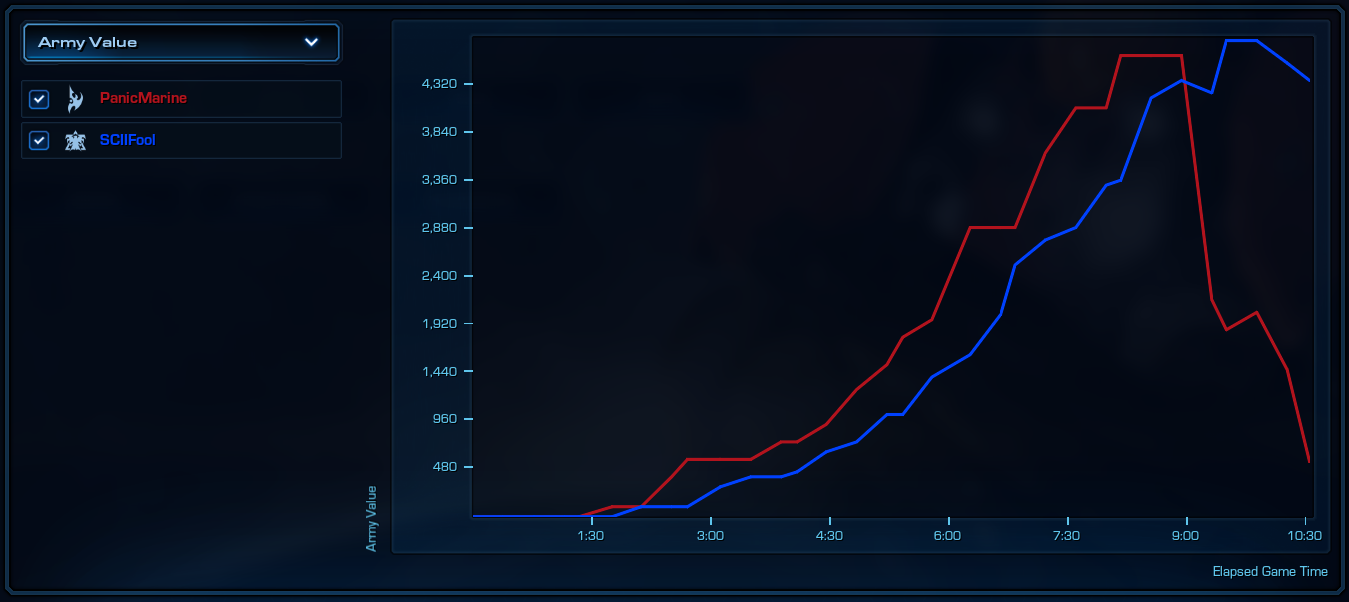
Score screen: Graphs: Army Value

 The army value graph is the sum of mineral and gas for the units that makes up your army. It's that simple and it's important to realize that it doesn't show the value of upgrades. This might be misleading since you could take a look at the graph below and wonder why I came out on top although my opponent had an army value advantage. The answer in this particular case is that I had superior upgrades and a decent position.


It's important to understand what the different graphs show to be able to reason about them.

2017-09-20

Terran cost and build time chart

Sometimes I find it useful to have cost and build times in an easy to read chart. These numbers are for Legacy of the Void.


2017-05-07

The upgrade spending graph

I don't usually spend much attention to the Upgrade Spending graph on the Victory screen since it doesn't really tell me much. Sure it show if I was on par with my opponent or not and I'm sure there's a more specific information to be read from it.

What it basically is telling is when upgrades are finished. It doesn't tell when the were started. Here is an example from a game I recently played:


 The above shows how my opponent finished researching warp gate at ~5:00 and how I finished stim at ~6:08, +1 infantry weapons at ~6:40 and combat shield at ~8:00.

Now, imagine if the graph actually showed _what_ upgrade was finished _when_! Like if the above would look something like this:


 Now wouldn't that be something? :)

If I may keep on dreaming I would also want the graph to tell me when the upgrade was started since I don't know all the timings in my head and it would be useful to see if my starting timings was off.


How do you use the upgrading graph? What more can I learn from it? Please feel free to leave a comment!

2017-02-10

Trying to improve - Motivation

I just watched the video "Too busy to learn Blender?" about how to find the time and get over the hurdles of learning Blender and I think the tips given in that video is applicable to learning in general.

So how might this be used when learning/improving in StarCraftII? Here are some quick notes.


1. Set a Pre-Determined Project Deadline

This could be as easy as a number of games to be played before a certain date: "This week I will play 10 ladder games."

The goal is to play those 10 games and nothing else. Not to win. Not to macro properly. Not to micro like a beast. It's simply to play 10 games.

2. Look for small time windows

You don't need to play a ladder game but when ever you have a small window of time just fire up the game and practice some macro in a custom game or do some micro training in a mod. Or play _one_ game on ladder.

3. Agree to do one small thing

Start the game and press "Play". Then you can quit. All you have to promise your self is to load the game and press that play button.

4. Recognize the net gain in Happiness

This one is easy. Just think about why you play the game in the first place. :-)


Related reading: Mindset, Work, and Results

2017-02-02

Trying to improve - Rage/Tilt

As I slowly progress my game play I have noticed some things that makes it easier for me to remain in control when emotions run high.

1. Small breaks between games.

Just a minute or two. Maybe check twitter, read an article or just get a glass of water. Or stretch. Just anything to get that short break. Even when I win and I'm on a streak I take this break to clear my mind from the previous game and enter the new one with a clean state of mind.

2. Always wish GLFH and GG

If I'm too tilted to say GG I quit and walk away from the game cause then I'm in no condition to play. This rule is so hard to live up to but it's a great one.
I'm proud to say I almost never reaches that state any more and it's all thanks to the simple rule to always wish glhf/gg or walk away.

These two simple things has made me more in control and my game play have improved. I still get emotional of course and it's ok. I just try to not let it get the best of me.

Also check out this video from Jared 'PiG' Krensel:

2016-05-25

Twitch HTML5 player

Edit: Since HTML5 player is now the default for Twitch this post no longer of any interest and I've since moved on to use a combination of livestreamer and irc when watching Twitch streams.

Background

I got really fed up with how bad Twitch was working for me in Firefox. I love both Twitch and Firefox but I got very bad frame rate and theater mode and full screen is more or less unwatchable for me. The problem is present both with and without hardware acceleration enabled in browser. As per usual I blame this on Flash.
Chrome handles the Twitch flash player somewhat better but also behaves strangely from time to time, dropping frames and freezing. Not at all as bad as in Firefox

Solution

So I started to look around for a solution and discovered that Twitch do have a HTML5 player but the information around the web is fragmented, outdated and not very reliable. I did find this solution that works fine for me and satisfies my needs. I just use a URL like this, substituting channelname:
http://player.twitch.tv/?branding=false&html5&showInfo=false&channel=channelname
The official documentation can be found here but all parameters are not documented and HTML5 is not even mentioned. For example html5, branding and showInfo is not documented and their forum is not much help either.
Example:
Dethfanatics awesome StarCraft II stream
This show only the stream and nothing else, i.e no chat or other information.
Protip: You can use the Youtube HTML5 Video Player page to check if browser support HTML5 video player.

2016-05-21

StarCraft II settings

Trying out some new settings after watching Jakatak's Settings Guide. So, to document my journey, I am archiving them here.

Graphics


Sound


Voice


Mouse and keyboard


Gameplay


Social


Observer and replay

2016-04-10

Day 70, quick pickup/drop practice

Was checking out this new CSN Starcraft site after reading the introduction post on reddit starcraft and came across this Fast Pickup/ Drop Micro Tutorial.

So I spent some time practicing according to this simplified list:

Fast pick up
  1. select the air unit
  2. right-click the ground unit for pickup

Fast unload
  1. Unload hotkey
  2. left-click on the air unit to unload

Fast pick up and move away
  1. move command to a location near unit to pick up
  2. then shift-click the unit and move command away
Go ahead and watch the video to understand the details.

2016-04-09

Repetitive Strain Injury (RSI)

While watching a 24-hour stream by dethfanatic the problem with Repetitive Strain Injury came up on stream and in chat and the importance of  stretches was pointed out. This reddit post was linked with a lot of good stuff about this: A Public Service Announcement regarding Repetitive Strain Injury (RSI)


Take a couple of minutes to familiarize yourself with this, especially if this is an unknown issue for for you.

2016-03-28

Terran logo, 3D model, first render

Using the terran logo vector drawing from previous post as a starting point I finally came around to learn some basics of Blender, this incredibly powerful 3D suite. Here's the first rendering of the project:


Next thing will be to come up with some nice texture. I'm thinking some kind of metal. Later I will move on to create a smooth sculpted 3D surface to get an object looking like it has been machine carved right out of a solid block of metal.

Terran logo vector drawing, v1

Started to work on a basic terran logo vector drawing. Just getting the shape in place in this first iteration. I'm intentionally making it unsymmetrical cause I think it gives it a more organic kind of feeling.

Work in progress. Using Inkscape on Linux. Somewhere down the line I will use this for something... *building suspense* :)

2016-03-12

Nexus visual cues

When scouting protoss it is important to know what's going on. The Nexus animation is kind of subtle but this is what it looks like.

From left to right:
  1. not producing anything
  2. producing a probe 
  3. producing the mothership core
 
With cronoboost:

Without cronoboost:

2016-03-06

Macro Cycle

This is the concept of constantly going through a cycle of things to keep track and react to. I have been struggling with this and I found the article and the Day9 videos to be a huge help to understand how to approach this and start learning how to do it efficiently.

Go check em out!

PS. For some inspiration check out the VODs from IEM Katowice.

2016-02-02

Visual cues in StarCraft II

I recently started to try to pay more attention to the visual cues of units and buildings. I found this video showing off some the cues found in the game.


Unfortunately that video is a bit outdated.


Just for fun I made a short video showing off the visual cue of the Disruptor.


2016-02-01

Day One

This is day one of the folly adventures of a middle aged man and  his love for a game he is not really very good at.

There are a lot of great players with high quality streams and content to follow if you're interested in StarCraft II but what about all the rest of us?

Where is the consistent, high quality stream and content from the nice low level players? Players you can identify with that isn't embarrassed by, or afraid to show, their lack of skills and doesn't feel the need to be salty and call other players noob as soon as they get the chance (the forums and reddit has plenty of this already)?

Maybe there is a lot of content from mediocre and low skill players out there and I just haven't found it yet.